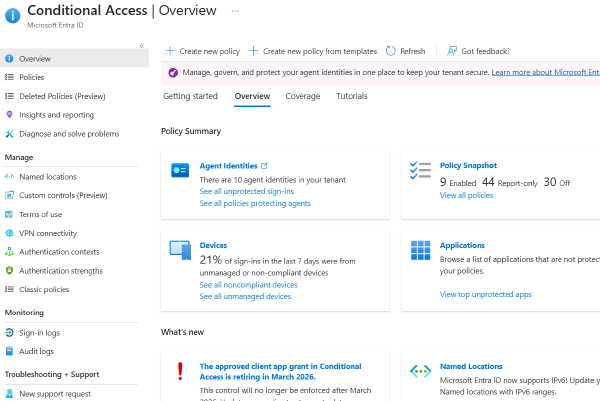
The Conditional Access blade in the Microsoft Entra admin center. Screenshot from Microsoft’s Conditional Access overview documentation, (c) Microsoft. TL;DR # I was given six hours to review an Entra Conditional Access implementation and report the issues I found. It was my first look at Conditional Access. What made it manageable was working the referenced objects before the policies, then exporting the policies to JSON and flattening them into a single CSV so the whole set could be read as a table instead of one blade at a time. Both halves of that are published in the Entra Conditional Access Review repository: the evaluation process, with the questions to answer about each object type, and the PowerShell script that converts the exported policies into the CSV you review.
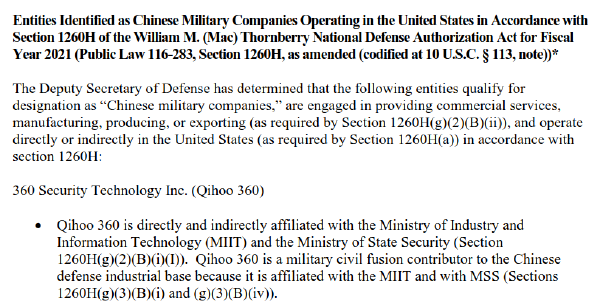
TL;DR # The U.S. Department of Defense publishes a list, under Section 1260H, of companies it has identified as Chinese military companies operating in the United States. I wanted to turn that roster of corporate names into something a defender can use: an inventory of the software those companies publish, and a way to find it on a Windows machine. This is enrichment work. It is the step before a threat hunt, not the hunt itself. I ran it twice. The first pass, with Microsoft Copilot, produced an analysis that looked right and a dataset that was empty. The second pass, with Claude Code, produced a dataset that was disciplined and mostly unverifiable. What shipped is smaller and honest: a sourced catalog of companies and their software, and a simple PowerShell script that gives you a place to start. The other cost was time. The fast start turned into a long slog dragging the work back to something trustworthy, and the lesson I am keeping is about managing that time, not the tools. The result is on GitHub.
From an empty repository to a useful Cisco ASA firewall review tool in about a day. Here is how it works, and where I had to overrule the AI.
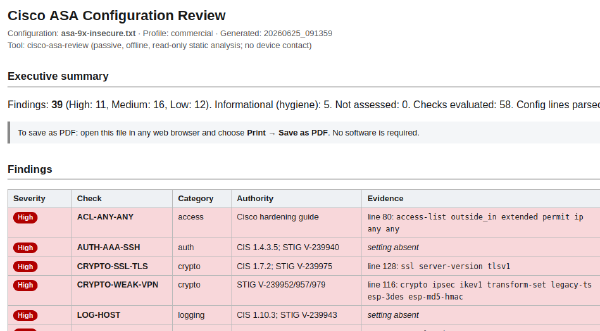
TL;DR # I built an offline, read-only tool that reviews a Cisco ASA firewall configuration and reports security findings. Point it at a show running-config dump and it returns a prioritized report: insecure management access, weak or deprecated crypto, overly permissive access rules, missing logging and hardening, and cleartext secrets. Every finding is backed by the exact config line that proves it, or a clear marker when the problem is a missing setting. The review runs entirely on your machine, with no internet and no device access, so nothing leaves the host. The tool is public at github.com/cutaway-security/cisco-asa-review.
Part 2. The first post showed what the technique produces. This post covers what it costs to produce, and what those numbers should change about how you fund your OT cybersecurity program.
Earlier this week I said AI was closing the knowledge gap for attackers faster than the industry was ready for. This is the technique, demonstrated.
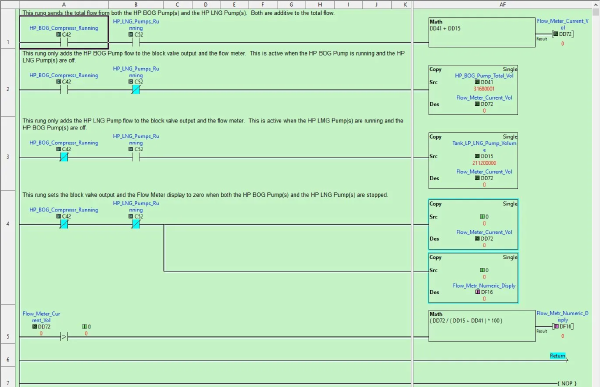
TL;DR for OT leadership: Threat actors no longer need years of industrial experience to plan targeted attacks on your operational process. They need your configuration files (logic exports, address maps, HMI project files, manufacturer reference documents) and access to a production AI tool. With those, the AI tool supplies the process expertise the attacker does not have. It reads the logic, infers the physics, maps cross-system dependencies, and produces ranked attack paths with protocol-level instructions for executing them. The industrial-process knowledge gap that used to be a natural barrier against precision attacks has collapsed. For leadership, that changes three priorities. First, configuration files are process intelligence and must be protected like safety documentation. That means backup validation, integrity checks, and inventories of every copy wherever it lives, including copies held by vendors and contractors, and copies on the IT network. Second, remote access to engineering workstations deserves the same scrutiny you apply to your highest-value production systems, because that is where the intelligence lives. Third, the investment required for an adversary to weaponize this technique is trivial. A single analyst workday and a few dollars of API cost. Assume it is in use today, and fund your teams accordingly.
TL;DR # Setting up a proper Windows testing environment for ICS/OT security tool development goes beyond spinning up a single VM. You need multiple Windows versions, from legacy Windows 7 through Server 2022, templated, sysprepped, and network-isolated so you can rapidly deploy clean test systems and tear them down when you’re done. This post summarizes my experience building a Proxmox-based development lab with automated VM management for testing Sysmon configurations and security scripts across every supported Windows version. The complete setup guide is available as a PDF download. We document these projects to both remember what we have done and also help others with similar projects.
Initially, I ignored the YouTube video, Flipper Zero attacking Smart Power Meters. I watched it. I thought it was “interesting.” But, I did not want to spend a lot of time on it. After all, it has been over ten years since my Black Hat / DEFCON 20 talk, Looking into the Eye of the Meter. I do not have the time, resources, or permission to do any more work on smart meters. So, I figured I would leave it to others to address the findings in this video and the person involved.
Introduction # It has been a while since I have analyzed any program or firmware. The majority of my previous experiences were mostly analyzing Capture The Flag (CTF) binaries with the help and instruction from my good friend Matt Carpenter of Grimm Security. While extremely helpful, I always knew I was looking for a vulnerability that should be easy to find since I mainly stuck with the easy to medium difficulty challenges. Analyzing actual firmware for a vulnerability is much different. While most programs “should” have vulnerabilities, there is no guarantee of a flag at the end, like in CTF binaries, that can be verified by submitting a string of bytes for points.