TL;DR#
I was given six hours to review an Entra Conditional Access implementation and report the issues I found. It was my first look at Conditional Access. What made it manageable was working the referenced objects before the policies, then exporting the policies to JSON and flattening them into a single CSV so the whole set could be read as a table instead of one blade at a time. Both halves of that are published in the Entra Conditional Access Review repository: the evaluation process, with the questions to answer about each object type, and the PowerShell script that converts the exported policies into the CSV you review.
Why Review Conditional Access Configurations#
Threat actors are taking advantage of two things for success. The first is the vulnerabilities in the remote access devices on an organization’s edge. The second is simpler: why exploit a vulnerability when you can authenticate to the edge device as a normal user? Both paths run through the same place, the controls we use to manage remote access. Our remote access devices are configured to allow users to connect. These user accounts are tied to Multi-Factor Authentication (MFA) and user passwords. The use of applications (apps) extends the complexity of these authentications because some users are allowed to use apps and others are not. Many organizations turn to Microsoft Entra ID (Entra), previously known as Azure Active Directory (Azure AD), for managing remote access.
Large organizations have teams that are dedicated to managing Entra configuration and maintenance. In these cases the teams can leverage configuration tools to manage the complex associations between users, groups, applications, administrators, device types, and many other considerations. For smaller organizations these concerns are the same but the team is smaller, sometimes much smaller. A small cooperative, water utility, or industrial manufacturing administrative team may have set things up but they won’t get back around to maintenance for a while. Commonly, their interactions with Entra are to make things work when users need something. This condition leads to operational scope creep and this is where implementation issues occur.
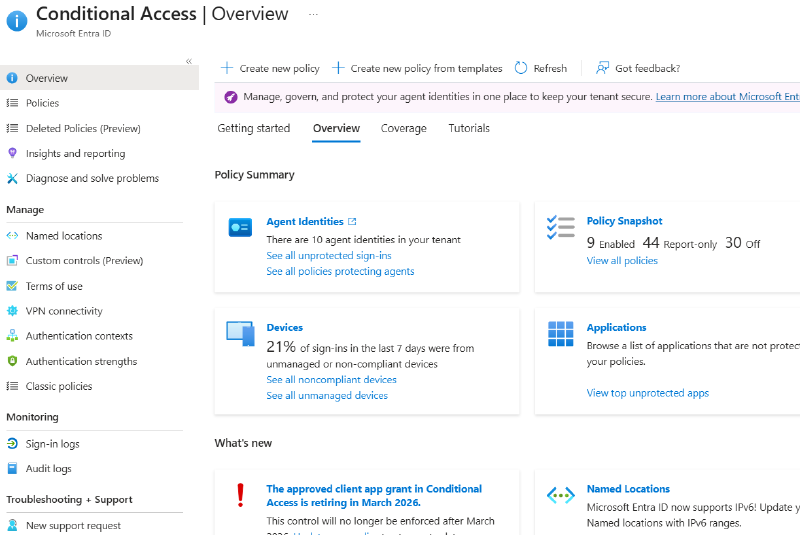
During a recent effort I was tasked with spending six hours reviewing an Entra Conditional Access implementation, identifying implementation issues, and making recommendations. This was the first time that I have looked into Entra’s Conditional Access configuration. To start, the team provided me with read access to the Conditional Access area of the Entra admin center. This allowed me to see the policies and I clicked on a few to see what I was dealing with. I immediately noticed that these policies are a consolidation of other objects, similar to a firewall configuration. That knowledge made me realize that I needed to understand the objects before I could start reviewing the policy configurations.
Next, I turned to reviewing what automated analysis capabilities were out there. My initial searches identified Conditional Access baseline projects such as ConditionalAccessBaseline. A review of these showed that they are useful but they seem intended for simplifying larger and more complex implementations. I did not have the time to learn them, and this implementation was not complex enough to justify migrating to them. The small team constraint is real and learning new techniques takes time that is required for other administrative duties. I, and the administrative teams, did not have time to follow this path. There had to be another way.
To find it, I turned to an enterprise instance of Microsoft Copilot to give me a plan. I explained that I needed to analyze Entra Conditional Access by understanding the different configuration objects, first, to coordinate a review of the conditional access policies. Copilot analyzed the request, reviewed online resources, and then provided the following plan, which I have summarized here.
Assessment Plan#
The following management areas will be reviewed to answer specific questions. The Conditional Access policies implement each of these management areas as objects and integrate their configuration to manage access. Answer the questions about each of these areas prior to reviewing the policies.
NOTE: Update these configurations, as required. This is a time constrained assessment. Improving configurations as we go does not make this a moving target. It is addressing implementation issues in real-time.
- Named Locations
- Is it an IP range or country-based?
- What is its purpose: office, VPN, datacenter, vendor?
- Is it marked as Trusted? Why?
- Is the range overly broad?
- Who owns the network?
- Is it still in use?
- Authentication Strengths
- Which policies use them?
- Are administrators using stronger authentication?
- Is SMS still allowed for privileged accounts?
- Authentication Context
- Where are they used?
- What resources trigger them?
- Are they still needed?
- Custom Controls
- Where are they used?
- What resources trigger them?
- Are they still needed?
- Policies
- Each policy has a collection of configurations that applies all the previous objects.
NOTE: I am not providing examples here due to the sensitivity of information. Blurring objects takes time and requires approval that may not come. You can figure it out.
Policy Review#
The review of these objects will make understanding the policy configurations easier. However, the GUI for Entra Conditional Access policies is useful for configuration but not for analysis. In fact, using the Entra admin center GUI to perform a manual review of the policies is a risk because it is difficult for a human to correlate all of the policy details. The alternative, and better approach, is to export the policy into JSON files.
A Conditional Access policy JSON file is a structured collection of the policy’s configuration. It contains all of the details in a single location and makes it much easier to review. While easier, the amount of text data in the file is still a visual challenge. Additionally, the individual files make it difficult to understand correlations and to have interviews with the administrators. A better method, for analysis and interviews, is to convert each of the JSON files into a CSV file with the same data. The JSON details can be converted into column-based representation of the information. Each policy becomes an individual row in the CSV file.
To this end, I had the same Copilot session generate the PowerShell script Export-ConditionalAccessAudit.ps1. This script will read all of the policy files in a directory, convert the policy’s configuration from JSON to CSV, and store each policy configuration as a new row in a CSV file. The resulting CSV file can be opened in Microsoft Excel and saved as an Excel file to preserve the original information and allow for marking during a review with administrators.
The script, the assessment process described above, and the details for running both are published in the Entra Conditional Access Review repository. The repository’s README documents how to export the policies from your tenant, how to run the script, what each output column means, and the ways the output can be misread.
NOTE: The resulting information will contain GUIDs for certain objects, such as accounts and applications. These GUIDs will require a manual pass to convert them into readable values. This can be automated with some PowerShell cmdlets, if they are installed. However, doing it manually helps to confirm the configurations and prepares the assessment team for the conversation with administrators.
Closing Thoughts#
Small teams are challenged with the amount of time and tools they can use to audit and maintain their remote access configurations. Time and money are not an excuse for insecure remote access configurations. These teams need to get creative to overcome these issues. Leaders also need to understand that periodic auditing, time, and sometimes third-party help is required to ensure remote access is configured and maintained properly. Threat actors understand the difficulty of these technologies. Make it more difficult for them. Prevention starts with configuration. Detection becomes possible when the threat actors are forced to make multiple attempts to bypass or take advantage of a configuration. Response is required when the configurations cause alerts associated with suspicious and malicious activity.
Prevent - Detect - Respond - Recover - Restore Your journey starts here.
Go forth and do good things,