From an empty repository to a useful Cisco ASA firewall review tool in about a day. Here is how it works, and where I had to overrule the AI.
TL;DR#
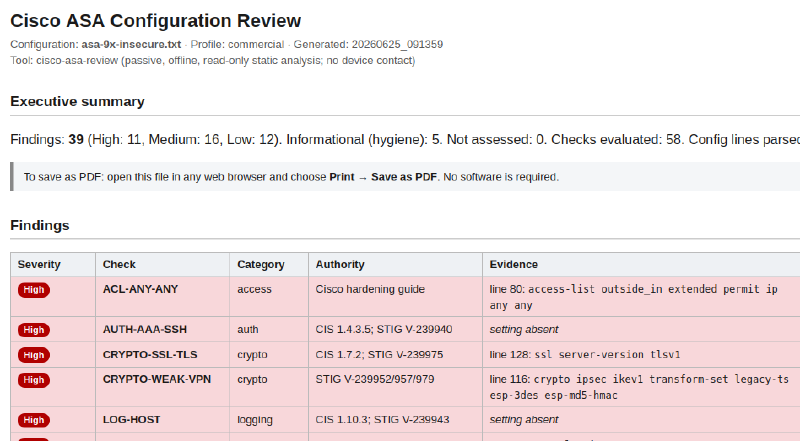
I built an offline, read-only tool that reviews a Cisco ASA firewall configuration and reports security findings. Point it at a show running-config dump and it returns a prioritized report: insecure management access, weak or deprecated crypto, overly permissive access rules, missing logging and hardening, and cleartext secrets. Every finding is backed by the exact config line that proves it, or a clear marker when the problem is a missing setting. The review runs entirely on your machine, with no internet and no device access, so nothing leaves the host. The tool is public at github.com/cutaway-security/cisco-asa-review.
I went from an empty repository to a useful tool in about a day, working with AI the whole way. If that makes you skeptical, good, because the interesting part is not the speed. It is the discipline that made the speed trustworthy: a planned and gated build, independent review at the decision points, and me verifying the work at every step rather than taking the machine’s word for it. The second half of this post walks through that process, because how you direct and check the AI is the whole game.
The problem: ASA reviews are tedious and inconsistent#
If you have ever reviewed a firewall config by hand, you know the drill. You open the running-config, run a dozen greps for the things you remember to look for, and eyeball the rest. The findings you produce depend on which fifteen things were top of mind that day. Do it again next month and you get a different list.
A firewall config resists that approach for two structural reasons. First, an ASA config is hierarchical and reference-laden. Object-groups nest inside object-groups, access-lists reference objects that reference names, and the findings that matter, like an overly broad rule or a cleartext secret buried in a sub-block, only fall out of a proper parse-and-resolve pass. Flat grep walks right past them.
The second reason is harder. A large share of real findings are absences. No logging enable. No ssh version 2. No uRPF. You cannot grep for a line that is not there. You need a model that knows what should be present and reasons over what is missing. Add to that the CIS Cisco ASA Benchmark and the DISA Cisco ASA STIG, which together run to many dozens of checks, and it becomes obvious why no human applies all of them uniformly every time.
Where this fits, and where it doesn’t#
I will be straight up front: this tool is a stopgap, not the mature method.
A proper firewall review correlates one device’s configuration with the routers, switches, and other firewalls around it to reason about end-to-end access paths and segmentation, and it applies deep, device-specific checks across many product families. Tools built for exactly that work already exist, and they do it well. Network Perception NP-View does cross-device access-path and segmentation analysis. Titania Nipper does pentester-grade per-device audits with pass/fail compliance evidence across a long list of device types. I am not trying to compete with either of them. If your team does this work seriously, prefer those tools, and nothing here should talk you out of buying them.
My tool is for the gap before you have them, and the moments you cannot reach for them: a quick offline look at a single ASA config, with nothing to install and no data leaving the host. Use it where it helps, then graduate to the real thing. One of its better uses is building that case: surfacing enough on a config to make the budget conversation concrete.
For the ICS and OT crowd, the issues it flags line up cleanly with two of the SANS Five ICS Cybersecurity Critical Controls. The segmentation view and the over-permissive rules speak to Control 2, Defensible Architecture. The insecure management access and weak VPN crypto speak to Control 4, Secure Remote Access. That mapping is the point of doing the review at all.
What the tool does#
Under the hood, the tool reads the config, parses it into a queryable hierarchical model, resolves names and object-groups (recursively, with a cycle guard), and then runs its 58 checks. Those are the commercial catalog; a DoD/STIG profile is selectable, with the DoD-specific checks still on the roadmap. Most checks map to a CIS or DISA STIG reference; a handful are tool heuristics, and they are labeled as such so you know which is which.
Every finding carries its evidence: either the exact config line or an explicit absent marker when the issue is a missing setting. That was non-negotiable for me. An analyst has to verify a finding before putting it in front of a client, and a finding with no evidence gets discarded, so the evidence is the deliverable.
It produces three artifacts next to the config file, never overwriting the input:
- a Markdown report for consolidating with other findings,
- a CSV with remediation-tracking columns, for the team to work the list,
- a single self-contained HTML report for the client.
The HTML is the one I am most happy with. It opens in any browser with nothing installed and no internet connection. The zone topology is hand-emitted inline SVG, the connectivity matrix is a colored table, the CSS is embedded, and there is no JavaScript and no external reference of any kind. That last part is deliberate: an HTML file with only SVG and CSS survives the strict mail and secure-transfer gateways that strip anything with script in it. For a PDF, the client opens it and prints to PDF. No extra software on either end.
Offline and read-only on purpose#
A firewall config is sensitive client data. It should never leave the analyst’s host, so the review is built so that it cannot. It never connects to a device. It makes no network calls in the review path: no downloads, no DNS, no telemetry, no update checks. The reference URLs in the findings are inert text, never fetched. It only reads the file you hand it, and it treats the config as data to be parsed, never executed.
There is exactly one script in the project that touches the network, and it is a separate, opt-in maintenance utility for refreshing the end-of-life reference. It is never part of a review. The analyst exports the running-config out of band through their own authorized means and hands the tool a text file. Collection is not the tool’s job.
Planning before any code#
The AI part starts here, and not where people assume.
Before writing a line of PowerShell, I ran a structured planning pass with the AI: a vision document, then requirements, then measurable success criteria, then an architecture, each one written down. Then I did something I have come to rely on. I handed the plan to other large language models, from different vendors, and asked each to tear it apart as a hostile reviewer. Independent reviews, no cross-talk.
That review pass changed the design before it cost me anything. Three results stuck:
- The first version was over-scoped, and the parser, the load-bearing piece everything else depends on, was not isolated. So I split the first milestone in two: prove the parser by itself against real, sanitized device output, then build checks on top of it. A parser defect should surface as a parser-test failure, not as a weird finding three layers up.
- Secret masking started life as a “should.” The reviewers argued it had to be a hard default, because the deliverable is otherwise full of credentials. They were right. It became a default-on requirement with a conservative fallback.
- The check catalog was about to bake in DoD-specific assumptions that produce noise on a commercial ASA. The fix was to make the profile an explicit piece of data, commercial by default, DoD opt-in.
None of that is glamorous. All of it is the difference between a demo and a tool.
From zero to useful#
This is the part that still gets me. The commit history tells the story honestly, so here it is.
| Milestone | Elapsed from empty repo |
|---|---|
| Planning set committed, empty repo | 0 |
| Parser proven against real sanitized configs | about 25 minutes |
| Working MVP: 15 checks, produces a findings report | about 1.5 hours |
| First tagged release | about 2 hours |
| Full product: 58 checks, HTML deliverable, end-of-life lookup, performance fix | one focused day |
| Public, polished, examples committed | the next morning |
Honestly, that first day was full but not continuous. I stepped away for a stretch in the afternoon, and again in the evening. Call it ten to twelve hours of elapsed time, then about ninety minutes the next morning to finalize the documentation and put it out. What surprises me is not the polish at the end. It is that a useful tool, one that parsed a real sanitized config and produced a real findings report, existed inside the first two hours.
What the process caught#
Fast does not mean unchecked. The discipline earned its keep by catching things I would not have found by staring.
I built a benchmark that runs the tool against generated configs up to twenty thousand lines. The parser was cleanly linear. The full pipeline was not: 24.5 seconds at twenty thousand lines, and getting worse as it grew. The culprit was the pass that decides whether each ACL or object is referenced anywhere, which was scanning every line for every entity. Inverting it into a single token index dropped that run from 24.5 seconds to 5.1 and brought the growth back to near-linear. The lesson I am keeping: my first performance metric quietly lied, because it averaged over sizes that had not yet entered the bad regime. The honest test was watching how the time changed as the input doubled.
The other one was a genuine logic bug. In PowerShell, comparing a boolean against a string coerces the string to a boolean, so a real “permit ip any any” expressed through an object-group was being silently misread and dropped from the segmentation map. No test I had written exercised that path, so the suite stayed green. The bug only showed up when I looked at the actual end-to-end output, not just the passing tests. That is the discipline that matters more than any tooling: verify against real output, not just a passing test suite.
Refereeing the machines#
The most important skill in all of this is not prompting. It is judgment about which AI output to keep.
When I had the documentation reviewed by several models near the end, I got a useful pile of feedback and a few confident errors mixed in. One model insisted the catalog had 68 checks. It has 58. I counted. Another claimed whole files were missing when they had simply been left out of the review bundle on purpose. A third raised a stylistic complaint that did not hold up. I threw those out and kept the genuine consensus, which pointed at real gaps: the docs needed example output, a clearer explanation of the severity tiers, and a tighter scope on one of the “no network” claims.
That is the part people miss about working this way. The models are fast and they are often right, but they are confidently wrong often enough that you have to be the editor, not the audience. The tool reflects my judgment because I overruled the AI exactly where it needed overruling.
Honest limits#
I will not oversell this. The development was done entirely offline, and I never had a live client device or a production config in hand. Validation leaned on synthesized, syntactically faithful fixtures plus a couple of real sanitized configs from public sources. Several checks are heuristic and may over- or under-flag on a real device, and “no findings” is never proof of a secure config; it means the checks did not fire. The tool is a fast first pass, and the project ships a manual review checklist for exactly the things it cannot see, like NAT exposure, ACL shadowing, and whether logging actually reaches a monitored system.
That said, I have since pointed it at a real production ASA configuration, and it earned its keep. It surfaced enough good findings to improve that firewall’s configuration and to justify stepping up to a tool that can correlate configurations across devices. That is precisely the job I built it for: find real issues now, and make the case for the better tooling next.
That honesty is not a disclaimer bolted on at the end. It is the same discipline that produced the thing in a day: know what you are claiming, and prove it.
The tool is public and GPL licensed at github.com/cutaway-security/cisco-asa-review. If you review ASA firewalls, give it a run on a config. Submit any issues or ideas on GitHub so it gets better. And when you put it to good use, or when it nudges you to build your own helpful tool, tag Cutaway Security on LinkedIn and tell that story. I want to hear it.
Go forth and do good things, Don C. Weber